Reconciling using matches
During the reconciliation task, the translations from translator 1 and translator 2 are handled as matches and are displayed in the Matches pane.

A reconciler's task in practice consists of one of these three options:
- Inserting one of the two matches (and then modify it if needed), OR
- Combinining part(s) of the two matches, OR
- Translating the segment from scratch if none of the two matches is suitable.
By default, the translation 1 match is activated. It is the first one in the list and it is bolded. If you want to use the match from translator 2, double click on it to activate that one instead (the activated match will become bolded).

To insert the active match in full, press Ctrl+I on your keyboard. After inserting it, make any necessary changes so that it fits the segment you are reconciling.
Alternatively, you can also insert only part of a match or combine several matches:
- Double-click the match you want to use to activate it
- Drag your mouse over the part of the match you wish to insert to select it
- Press Ctrl+I on your keyboard to insert it
- Select (part of) another match if appropriate or type the rest of the translation

Context properties
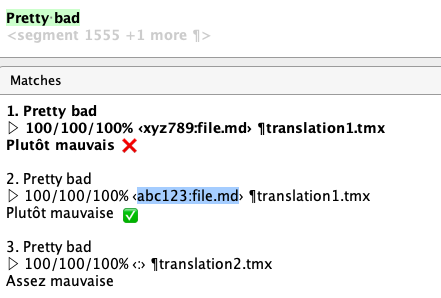
Translation 1 or translation 2 might be alternative translations, if the translators had a reason to prevent autopropagation of the default translation into the active segment. In that case, context properties (segment ID and file) will appear right after the match score.
Context properties may help you discriminate between matches that are meant for different segments. For example, to reconcile segment with key abc123 and file file.md you should consider any alternative translations with those context properties and ignore (or be wary about) any other.
Remember
It is important to make sure the final translation is harmonized as the two translators may use different terms and styles. To ensure this, make sure you preview the item prior to delivery and perform concordance searches to ensure consistency through the project with other segments where the same phrases (e.g. instructions) or terms appear.